Download GB WhatsApp APK
Get the GB WhatsApp APK for Android (v18.80, 85 MB, free). It is a third-party modified app, not Meta’s official WhatsApp. If Android asks you to allow installation from your browser or file manager, that is normal for an APK.
GB WhatsApp
- App name
- GB WhatsApp
- Version
- v18.80
- APK size
- 85 MB
- Platform
- Android
- Price
- Free
How to Install GB WhatsApp APK
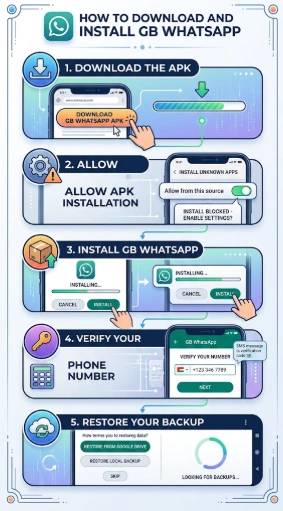
- Download the APK. Use the button above and wait until the file finishes saving on your Android phone.
- Allow installation from the relevant source. If Android blocks the file, open Settings and allow your browser or file manager to install apps from that source.
- Open the APK. Follow the prompts on the screen until the installation finishes.
- Open GB WhatsApp and verify the phone number you want to use.
Back up important WhatsApp chats and media before you switch to a modified app.
Common Installation Problems
- App not installed – Check available storage, Android compatibility, or whether another conflicting WhatsApp package is installed.
- Installation blocked – Enable installation permission for the browser or file manager being used.
- APK won't open – Download the file again if the APK appears incomplete or corrupted.
- App crashes after installation – Restart the phone and check whether the APK version is compatible with the Android version.
This page does not claim the APK is official, verified, or risk-free.